Locked Candidates Sudoku Technique Explained

The essential intersection technique for efficient solving

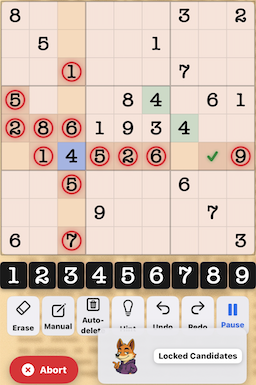
Locked Candidates example in Sudoku

What are Locked Candidates?

Locked Candidates (also known as Pointing Pairs, Pointing Triples, Box/Line Reduction, or Claiming) is a fundamental intermediate technique that exploits the relationship between 3×3 boxes and rows/columns. When all candidates for a number in a box are confined to a single row or column, those candidates "lock" the placement, allowing eliminations elsewhere.

This technique is essential because it bridges basic and advanced strategies, appearing in virtually every intermediate puzzle and creating breakthrough moments when simpler techniques have been exhausted.

5
Locked candidates within a box
Candidate that can be eliminated
4
Key analysis cell
4
Cells demonstrating the lock

The Core Principle

The Locking Rule: If all possible positions for a candidate within a box fall on the same row or column, that candidate MUST be placed somewhere in that intersection. Therefore, the candidate can be eliminated from the rest of that row or column outside the box.

This works because of Sudoku's fundamental constraints: each number must appear exactly once in every row, column, AND box. When these constraints interact at their intersections, they create locked candidates.

Advertisement

Two Types of Locked Candidates

Type 1: Pointing Pairs/Triples

Pattern: Candidates in a box are restricted to one row/column

Direction: Box → Row/Column

Elimination: Remove candidates from the rest of that row/column (outside the box)

The box "points" to where the number must go in the row/column

Type 2: Box/Line Reduction (Claiming)

Pattern: All candidates in a row/column within a box

Direction: Row/Column → Box

Elimination: Remove candidates from the rest of the box (outside the row/column)

The row/column "claims" the number for that box

Identifying Locked Candidates

Step-by-Step Process:

  1. Choose a candidate number to analyse (1-9)
  2. Examine a 3×3 box and note where that candidate appears
  3. Check for alignment – are all candidates in the box confined to a single row OR column?
  4. If yes (Type 1): Eliminate the candidate from the rest of that row/column outside the box
  5. Alternative (Type 2): Check if all candidates in a row/column segment fall within one box, then eliminate from the rest of that box
  6. Repeat systematically for all boxes and all candidate numbers

Visual Demonstration

Type 1: Pointing Pair Example

5
5

Candidate 5 in this box appears only in the top row.
Therefore, 5 must be placed in one of these cells,
eliminating 5 from the rest of that row outside this box.

Analysing the Example

Understanding the Locked Candidates Pattern

In the displayed puzzle, we can observe several key elements that demonstrate locked candidates in action:

Red Circled Numbers: The multiple red circles mark candidates that are part of the locking pattern. Notice the concentration of red circles in rows 4, 5, and 6:

  • Row 4: 5 (column 1)
  • Row 5: 2, 8, 6 (columns 1, 2, 3)
  • Row 6: 1, 5, 2, 6 (columns 2, 3, 4, 5)
  • Row 7: 5 (column 3)
  • Row 9: 7 (column 3)

These marked candidates show where potential locked candidates exist. When candidates in a box are confined to specific rows or columns, they create locking patterns.

The Blue Cell (Row 6, Column 3): The blue-highlighted 4 represents a key analysis point. This cell is significant because it's part of the intersection between a box and a row/column where locked candidates apply. The placement of 4 here may be the result of eliminations made through locked candidate analysis.

Green Background Cells: Two cells contain 4 with green backgrounds:

  • Row 4, Column 6
  • Row 5, Column 7

These green cells demonstrate how locked candidates in one area can influence placements in related areas. They show the cascade effect of proper candidate locking.

The Green Check Mark (✓) in Row 6, Column 8: This mark indicates a successful elimination made possible by identifying locked candidates. When candidates are locked in one part of a box-row or box-column intersection, eliminations can be made in the remainder of that line.

How the Lock Works

Looking at the middle-left box (rows 4-6, columns 1-3), we can see multiple candidates marked with red circles. When analysing this box:

  1. Identify which candidates are confined to single rows or columns within the box
  2. For candidates that only appear in one row of the box, eliminate them from the rest of that row (columns 4-9)
  3. For candidates that only appear in one column of the box, eliminate them from the rest of that column (rows 1-3 and 7-9)
  4. These eliminations often create new solving opportunities, as shown by the green check mark
Advertisement

Detailed Examples

Type 1 Example: Pointing Pair

Scenario: In the top-middle box (rows 1-3, columns 4-6), candidate 7 appears in only two cells: row 2 column 4, and row 2 column 6.

Analysis: Both 7 candidates are confined to row 2 within this box. This means row 2 MUST contain a 7 somewhere in columns 4, 5, or 6.

Elimination: Since row 2 will have its 7 in the top-middle box, we can eliminate all 7 candidates from row 2 in the other columns (columns 1-3 and 7-9).

Reasoning: The box constraint forces the 7 into row 2 within the box, which then enforces the row constraint by excluding 7 from the rest of that row.

Type 2 Example: Box/Line Reduction

Scenario: In column 5, all candidate 3s that appear in rows 4-6 (the middle section) are within the middle-middle box.

Analysis: Column 5 must have a 3 somewhere in rows 4, 5, or 6. Since these are all within the middle-middle box, that's where column 5's 3 will be placed.

Elimination: We can eliminate all 3 candidates from the rest of the middle-middle box (the cells not in column 5).

Reasoning: The column constraint claims the 3 for the middle-middle box, which then enforces the box constraint by excluding 3 from other positions in that box.

Why Locked Candidates Matter

Essential for Progress: Locked Candidates are often the first technique needed after exhausting basic methods. Many intermediate puzzles cannot be solved without this technique.

Creates Cascades: Eliminating even a single candidate through locking often reveals naked singles, hidden singles, or additional locked candidates.

Appears Frequently: Unlike advanced techniques that appear occasionally, locked candidates occur in virtually every puzzle above beginner level.

Easy to Learn: The logic is straightforward – if candidates are confined to one line within a box, eliminate them elsewhere.

Advertisement

Systematic Scanning Strategy

The Box-by-Box Method

  1. Choose a box to analyse (e.g., top-left box)
  2. For each candidate number (1-9):
    • Identify where that candidate appears in the box
    • Check if all appearances are in one row → eliminate from rest of row
    • Check if all appearances are in one column → eliminate from rest of column
  3. Move to next box and repeat
  4. Complete all 9 boxes for thorough coverage

The Line-by-Line Method

  1. Choose a row or column to analyse
  2. For each candidate number (1-9):
    • Check if all candidates in one box-section of that line
    • If yes → eliminate from rest of that box (Type 2)
  3. Move to next line and repeat
Pro Tip: When starting out, focus on Type 1 (Pointing) first, as it's usually easier to spot. Once comfortable, add Type 2 (Claiming) to your scanning routine. Eventually, you'll naturally notice both types as you analyse the grid.

Common Mistakes to Avoid

  • Eliminating from the locked candidates themselves: Never remove the candidates that form the lock – only eliminate from other cells in that line
  • Missing the alignment: Ensure ALL candidates in the box are truly confined to one row/column
  • Wrong elimination direction: For Type 1, eliminate outside the box; for Type 2, eliminate outside the row/column
  • Forgetting to check both types: Don't just look for one type – both can appear in the same puzzle
  • Not updating after each elimination: New locked candidates can appear after making eliminations

Integration with Other Techniques

Before Locked Candidates

Typically apply these first:

After Locked Candidates

These become more visible after locking:

Parallel Techniques

Use alongside locked candidates:

Practice Strategy

Building Locked Candidate Skills:

  1. Master pencil marks first – accurate candidate tracking is essential
  2. Start with one box – analyse it thoroughly for all 9 candidates
  3. Use highlighting – colour-code boxes or lines you've already checked
  4. Check systematically – develop a consistent scanning pattern
  5. Verify before eliminating – confirm all candidates are truly locked
  6. Look for cascades – each elimination might reveal more locks
  7. Practice on intermediate puzzles – they heavily feature this technique
Remember: Locked Candidates are about intersections. Every cell in a Sudoku grid belongs to both a 3×3 box AND a row AND a column. When constraints from different units interact at these intersections, locked candidates emerge. Train yourself to constantly think about these relationships as you solve.

Advanced Considerations

Multiple Locks in One Box

A single box can have locked candidates for multiple different numbers simultaneously. Check each candidate individually – don't assume finding one lock means there are no others.

Hidden Locks

Sometimes locked candidates aren't immediately obvious because the cells contain multiple candidates. Always examine candidate patterns carefully, even in cells with 4-5 candidates.

Temporary Locks

A locked candidate pattern can disappear after placing a number or eliminating candidates. This is normal – the pattern served its purpose and created progress elsewhere.

Conclusion

Locked Candidates represent a crucial milestone in Sudoku solving development. They're the first technique that requires you to think about how different Sudoku constraints interact with each other, rather than just applying single constraints in isolation.

The beauty of locked candidates lies in their certainty and frequency. Unlike advanced techniques that require complex pattern recognition, locked candidates follow simple, clear logic: if candidates are confined to one line within a box, they can't appear elsewhere on that line. This straightforward reasoning makes the technique accessible whilst remaining powerful enough to solve most intermediate puzzles.

Master locked candidates, and you'll find yourself solving intermediate puzzles with confidence, rarely getting stuck for long. The technique creates a bridge between basic solving and advanced strategies, opening the door to techniques like X-Wing, Swordfish, and beyond. More importantly, understanding locked candidates trains your mind to see Sudoku as an interconnected system of constraints – the key insight for becoming a truly skilled solver.